Your week,in order.

Maid4Maid keeps the schedule, the crews and the invoices of a small cleaning company in one place. You see the whole day on one screen. Each cleaner sees only their own, on their phone, in their language, even with no signal.

14 days free. No card needed.

A week, start to finish

One week at a small cleaning company.

Same week as always. What changes is where it lives.

  1. Mon 2
  2. Tue 3
  3. Wed 4
  4. Thu 5
  5. Fri 6
  6. Sat 7

01 Monday

6:40AM

Schedule

Ana can't make it tomorrow. You move two jobs, not the whole week.

Your recurring customers are already on the schedule: weekly, every other week, the last Saturday of the month. You set them up once. When plans change, drag the job to another crew, and the cleaners get a phone alert that tomorrow changed.

  • Day, week and month views, filtered by crew or customer
  • Each crew's route on a map
  • Average time per home, so you book the right hours
02 Tuesday

10:15AM

My day

No signal in the basement. The job still gets done, and logged.

Each cleaner opens My day and sees only her jobs: the address, the entry code, the tasks, what's special about this home. She taps start, checks off tasks, takes the before and after photos. With no signal, it all waits on the phone and goes out when the connection is back, with the time it really happened.

  • Installs from the browser. No app store, no download.
  • Before, after and issue photos
  • Each person sees the app in their own language

03 Wednesday

11:02PM

Bookings and estimates

A new customer asks for a price at 11 p.m. Your page answers.

Your booking page asks what you'd ask on the phone: bedrooms, bathrooms, square footage, pets, how often. The price comes from your own rules, and the request lands in Bookings for you to confirm in the morning. For the bigger jobs, send an estimate: the customer accepts or declines from a link.

  • Your prices, your extras: inside the fridge, the oven, the windows
  • Discounts for weekly, every-other-week and monthly, set by you
  • The customer picks a date. You confirm it.

04 Thursday

5:30PM

Finances

The job's done. The invoice is already out.

Bill per visit, per hour or by monthly plan. Invoices go out at the end of the day or on billing day, with a Pay button. Your customer pays online through your own Stripe or Square account, in full or in parts, and you see who's paid and who's late without opening a spreadsheet.

  • Due-date reminders sent for you, without you
  • Per-customer statements: paid, owed, overdue
  • Partial payments recorded on the right invoice

05 Friday

4:00PM

Automations

The messages you'd send on a Friday send themselves.

Confirming tomorrow's jobs. Asking for a review after a clean. Nudging about an invoice. Build simple when / if / then rules, or start from a template, and they go out by email, text or phone notification. Before you turn one on, you see how many times it would have run last week.

06 Saturday

Saturday is yours.

The weekly summary shows what came in and what's still owed. Next week is already on the schedule.

One account. Three screens.

Everyone sees what they need, and nothing more.

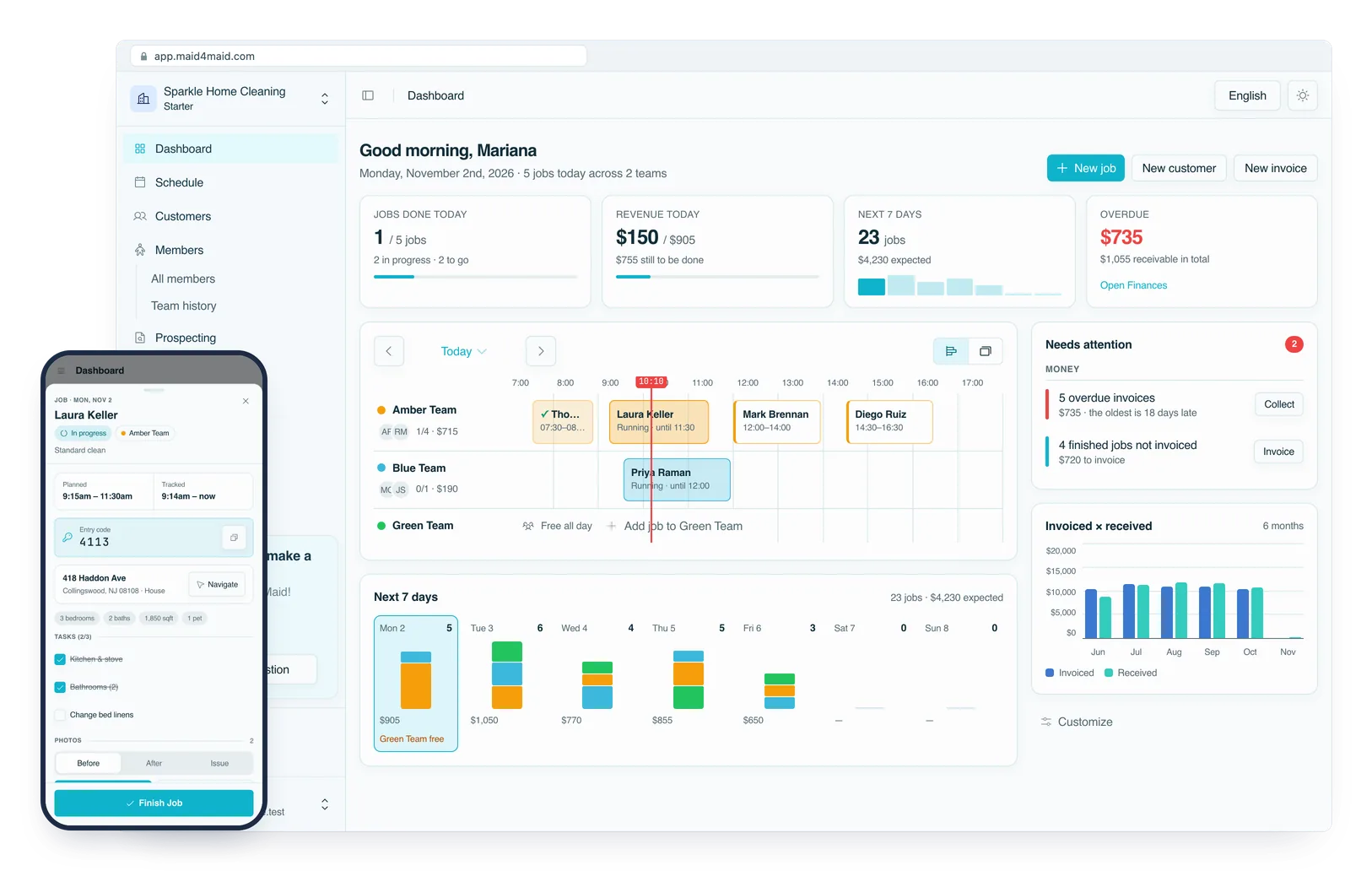
The real Maid4Maid dashboard for Sparkle Home Cleaning on a Monday, and a job in progress on a cleaner's phone at Laura Keller's home, with the entry code and the tasks
Real screen, demo data.

Everyone works in their own language.

You run the office in English. Ana reads her day in Portuguese. Luis reads his in Spanish. Each person picks a language for their own account, and every screen they use follows it, from the schedule to My day.

Invoices go out in your company's language.

  • English

    My day on a real phone, in English
  • Español

    My day on a real phone, in Spanish
  • Português

    My day on a real phone, in Portuguese

Real screens, demo data.

And the rest a cleaning company runs on.

  1. 01

    Many addresses per customer.

    Home, office, the beach house. Each address with its own entry code, bedrooms, pets and price.

  2. 02

    Who usually goes to each home.

    Does the customer love Ana? See who went on the last visits before you build the crew.

  3. 03

    Team history.

    Who worked with whom, on which day, at which homes. Recorded, and the past never gets rewritten.

  4. 04

    Texting from the customer profile.

    Connect your business number through Quo and text customers from their profile.

  5. 05

    On-the-way emails.

    The customer gets an email when the crew is heading over.

  6. 06

    Stripe, Square, Quo, Zapier.

    Get paid with Stripe or Square, text with Quo, connect the rest with Zapier.

  7. 07

    Public API and signed webhooks.

    For when you want Maid4Maid talking to your other systems. Many tools keep this for their most expensive plan.

  8. 08

    Many companies, one login.

    More than one location, or you work for another company too? Switch between them without logging out.

Start today. Bring what you already have.

  1. 01

    Create your company. All it needs is a name. Fill in the rest whenever you like.

  2. 02

    We bring your customers over. Send us your customer list from the software you use today, or from a spreadsheet, at support@maid4maid.com, and we bring your customers and their addresses into Maid4Maid for you. It's free and done within 5 days.

  3. 03

    Invite your cleaners. By email. Each one sets their own language.

  4. 04

    Plan the first week. Add your recurring jobs and the schedule fills itself in.

Pricing

Priced by the size of your crew.

Every plan has every feature. What changes is how many people and how many active automations. The price is right here on the page: no sales call, and you cancel from your own settings.

Solo

$25/mo

For owners who clean too and are just starting.

  • Up to 2 active people
  • 3 active automations
Start with Solo

Team

Recommended

$39/mo

For one or two crews on the road.

  • Up to 4 active people
  • 10 active automations
Start with Team

Business

$49/mo

For several crews, with room to add more.

  • 6 people included
  • $5/mo for each extra person
  • Unlimited active automations
Start with Business

In every plan

  • Schedule and recurring jobs
  • My day for cleaners, with no signal
  • Invoices and online payments with Stripe or Square
  • English, Spanish and Portuguese
  • Free customer migration
  • Bookings and estimates
  • API and webhooks

14 days free on any plan. No card needed.

Active people are everyone with access to your company: the owner, admins and cleaners. Prices in US dollars. Switch plans as your crew changes.

Questions we always hear.

Do I need to install anything? Is there an app in the store?

There's nothing to download. Maid4Maid runs in the browser on computers and phones. Your cleaners add it to their home screen and it opens like an app, even offline. It isn't in the App Store or Google Play.

My team speaks English, Spanish or Portuguese. Does it work?

Yes. Each person picks their own language, for the schedule, My day and every other screen. Invoices go out in your company's language.

What happens when a cleaner has no signal?

Her day is saved on the phone. Starting, finishing, checking off tasks and taking photos all work offline, and go out as soon as the connection is back, with the time they actually happened.

Can you bring my customers over from the software I use now?

Yes. It's free and done within 5 days. Send your customer list to support@maid4maid.com, exported from your current software or straight from a spreadsheet, and we bring your customers and their addresses into Maid4Maid for you.

How does the free trial work?

You get 14 days with the whole product, no card needed. When the trial ends, pick a plan. If you don't, your account switches to read-only and your data stays right where it is.

What counts as an active person?

Everyone with access to your company: the owner, admins and cleaners. Solo covers up to 2, Team up to 4. Business includes 6 and adds $5 a month for each extra person.

How do my customers pay me?

Connect your own Stripe or Square account. Invoices go out with a Pay button, your customer pays by card, in full or in parts, and the payment lands on the right invoice.

Can customers book and get a price on their own?

Yes. You set your prices, extras and frequency discounts, then share your booking page. Customers see the price right away and pick a date, and the request lands in Bookings for you to confirm. For anything custom, send an estimate they can accept from a link.

Can I cancel anytime?

Yes. You manage the subscription yourself in your company settings. No need to talk to anyone.

Your next week, in order.

Create your account, invite your crew and watch the schedule take shape.

Start your free trial

14 days free. No card needed.